SHARE


What is DNS hijacking?
In a DNS hijacking attack, a third party seamlessly forwards your company's web visitors to fake websites to steal login credentials and other data without your consumer knowing. Hijackers can also harvest information from company emails to launch sophisticated phishing campaigns and other attacks that appear to come from your domains. Beyond data security risks and brand damage, this poses significant privacy concerns, especially with regulations like the European Union’s General Data Protection Regulation (GDPR).
How does DNS hijacking happen?
At a basic level, the DNS serves as the internet's address book. When an individual types a domain name in a web browser, the DNS translates that name into a corresponding internet protocol (IP) address (a unique string of numbers) that web browsers use to identify where traffic is trying to go.
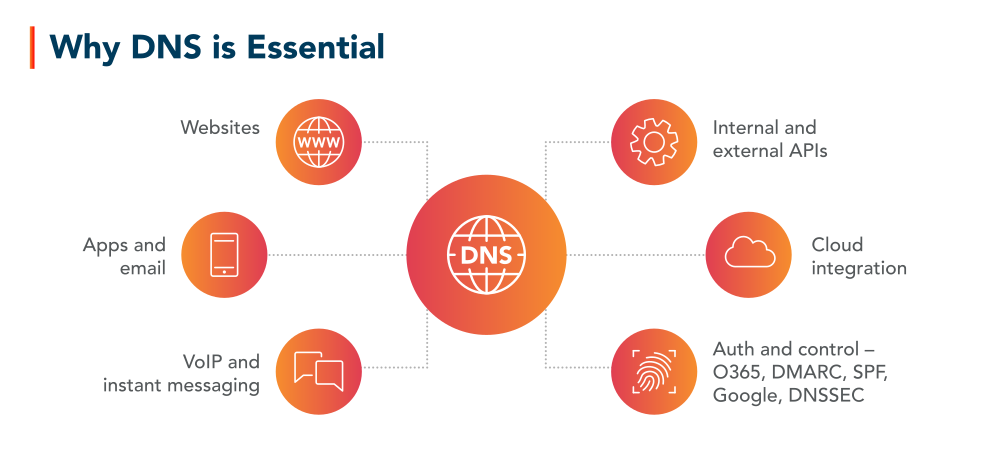
Why DNS is essential:
connected to
Websites
Internal and external APIs
Apps and email
- VoIP and instant messaging
- Cloud integration
- Auth and control - O365, DMARC, SPF, Google, DNSSEC
DNS hijacking occurs when bad actors compromise this process by altering DNS records, redirecting queries, or taking control of DNS servers, causing legitimate requests to be sent to malicious sites on different hosting environments. This can happen through compromised DNS provider accounts, security vulnerabilities in DNS servers, or poorly secured network infrastructure, such as routers with default credentials.
DNS hijacking vs. other DNS-based threats
DNS hijacking vs. domain hijacking
Domain hijacking, or domain name hijacking, gives attackers full control over a domain by stealing registrar credentials or fraudulently transferring ownership. Unlike DNS hijacking, which manipulates resolution paths without necessarily changing domain ownership, domain hijacking allows attackers to alter DNS settings, transfer domains, or hold them for ransom, causing prolonged disruptions. Reverse domain hijacking, on the other hand, is a legal dispute tactic where a party falsely claims trademark rights to seize a domain from its rightful owner, having no connection to DNS hijacking or domain hijacking. For more on this, see how cybersquatting, typosquatting, and other domain disputes affect businesses.
DNS hijacking vs. DNS poisoning
In a DNS poisoning attack, cybercriminals inject false DNS records into the cache of a DNS resolver. This causes the resolver to return an incorrect IP address, intercepting and redirecting users to malicious websites. The poisoned records usually expire once the cache is refreshed.
By redirecting traffic through DNS hijacking or poisoning, attackers can deceive users into visiting malicious sites. DNS poisoning is particularly dangerous because it allows attackers to intercept and manipulate communication, facilitating man-in-the-middle attacks. DNS hijacking, on the other hand, primarily focuses on redirecting users to attacker-controlled destinations, where they may unknowingly enter credentials or download malware.
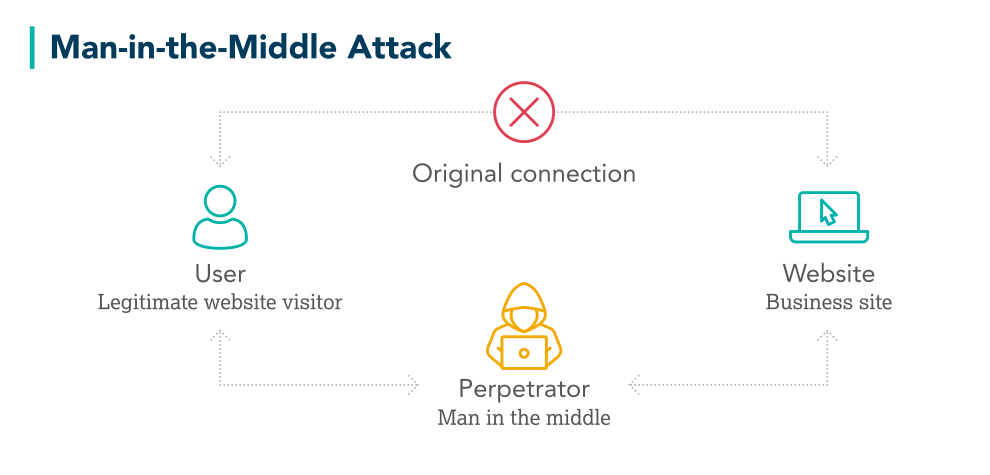
Man-in-the-middle attack
original connection between user and website is intercepted and manipulated by man in the middle
Domain hijacking vs. domain shadowing
Domain shadowing is another DNS-based threat where threat actors use compromised credentials to access domain settings. Instead of changing existing DNS records, they create new, malicious subdomains without the domain owner’s knowledge. Unlike DNS hijacking, which redirects entire domains, domain shadowing keeps the primary domain operational, making detection more difficult. These malicious subdomains are often used for phishing or distributing malware. Learn more on other ways attackers can exploit subdomains.
Three attack vectors used for DNS hijacking
In cybersecurity, vectors refer to specific methods or pathways through which an operation is carried out. There are three notable vectors used by hackers for DNS hijacking.
This method takes advantage of poor access and permission controls within a domain management system. Typically, a cybercriminal will obtain the username and password to a registrar's portal that is not protected by two-factor authentication or IP validation, giving them access to change the name servers for domains accessible within the account, giving them control of the content.
The registry itself could be compromised. This famously played out with a Brazilian registry in 2016 when 36 Brazilian bank domains were redirected to perfectly reconstructed fake sites for six hours. The fraudulent websites even had valid digital certificates issued in the bank's name, tricking clients whose computers were then infected with malware disguised as a bank browser security plugin update.
This method of attack stems from security gaps within the registrar’s or DNS provider’s systems. In some cases, these are the same entity, while in others, businesses use separate providers for domain registration and DNS hosting. Attackers exploit these weaknesses—whether through stolen credentials, misconfigurations, or social engineering—to manipulate DNS settings and redirect traffic.
How to stop DNS hijacking
When a DNS hijacking occurs, immediate action is recommended. Here are the key steps to address the breach:
- Reclaim control of the DNS environment by accessing your domain registrar or DNS provider account and revert any changes made by the assailants. Ensure that all DNS records point to the correct servers to restore proper connection.
- Change passwords and enable two-factor authentication for your domain registrar and DNS accounts to block unverified access.
- Remove malicious DNS entries. If attackers have altered DNS records, replace the malicious entries with the correct information for your website or service. This will stop users from being redirected to harmful sites.
- Notify your internal teams, partners, and customers about the incident. Let them know to avoid affected sites until the issue is resolved.
- Monitor DNS traffic for signs of further tampering and unusual activity after correcting DNS records and settings.
- Perform a thorough security audit to identify how the hijacking occurred. This might involve strengthening your defenses, like securing your DNS provider, networks, and accounts to prevent future incidents.
How to mitigate the risk of DNS hijacking
While it’s important to know how to stop a DNS hijacking, it’s far more critical to prevent one from happening. Consider the following strategies to protect against DNS hijacking:
- Ensure your domain registrar and DNS provider accounts are protected by strong, unique passwords, two-factor authentication and single-sign on (SSO). This prevents improper access to your DNS settings.
- Implement domain name system security extensions (DNSSEC) to add an extra layer of security by verifying the authenticity of DNS responses.
- Regularly review secure sockets layer (SSL) and transport layer security (TLS) certificates with a certificate management solution to ensure they’re valid, properly configured, and renewed on time. This helps prevent attackers from impersonating your website in the event of a DNS hijacking attempt.
- Protect your routers, servers, and internal networks by changing default passwords, using strong encryption, and keeping all firmware up to date. This limits weaknesses that can be exploited for infiltrating your DNS.
- Audit DNS records and traffic periodically for any unusual changes. Early detection of suspicious activity can stop a breach before it takes hold.
- Choose a reputable DNS provider that offers strong security measures and continuous monitoring. A trusted provider can help identify vulnerabilities and alert you to potential threats before they escalate.
How a registry lock helps prevent domain hijacking
According to our Domain Security Report, 107 of the Forbes Global 2000 companies didn’t use any recommended domain security measures, such as a domain registry lock. A registry lock is a high-level security feature that adds an extra layer of protection to your domain name by preventing fraudulent or accidental changes to critical domain settings. When registry lock is activated, modifications like DNS reconfigurations, domain transfers, or contact information updates, can only be made after a strict authentication process. This ensures only approved personnel can make adjustments, reducing the chances of tampering.
Secure business-critical domains with CSC MultiLock. Learn how our registry lock safeguards your digital assets.
Protect your enterprise against DNS hijacking
CSC can help you manage a range of threats. DomainSecSM provides you with a holistic overview to security oversights that make you susceptible to attack. Hundreds of the world's largest companies use our security services—such as MultiLock, our version of registry lock, to protect their organization and brands. These solutions offer the most compelling method to minimize your risk in the event of an attack.
Frequently asked questions (FAQ)
A DNS attack is any attempt to exploit vulnerabilities in the DNS to disrupt services, redirect traffic, or steal sensitive information. DNS hijacking is one example, where cybercriminals take control of DNS settings to manipulate how users reach websites and online services.
DNS hijacking involves taking control of DNS settings—often by compromising a domain registrar, DNS provider, or router—to redirect traffic to malicious destinations. DNS spoofing, on the other hand, is a broader tactic where attackers falsify DNS responses to mislead users without changing DNS records. This can be done through cache poisoning (injecting fake data into a DNS resolver) or real-time interception (manipulating DNS responses as they are requested). While DNS hijacking grants attackers sustained control over DNS resolution, spoofing is typically a temporary deception that manipulates individual DNS queries.
DNS hijacking is about redirecting users by altering DNS settings, while DNS tunneling is a technique that abuses DNS requests to secretly transmit data, often to bypass security controls or exfiltrate information. Unlike DNS hijacking, which manipulates existing DNS records, DNS tunneling typically requires the attacker to register their own domain and configure it to act as a communication channel for stolen data.
Related resources

Registry Lock and DNS Explained

A Basic Overview of DNSSEC

DNS: The Neglected Building Block, Part 4 – The Growing Threat of DNS Hijacking and Domain Shadowing

DNS Hijacking: The Iranian Cyber Security Threat That May Be Overlooked

CSC Alerts Companies to Increased DNS Hijacking

Global DNS Hijacking and How CSC Secures Your Digital Assets
Make an inquiry
All fields marked with * are required.