SHARE


What are SSL certificates?
SSL certificates are essential for securing websites. They encrypt data transferred between a user’s browser and the website, protecting sensitive information from cyber threats. When a website has an SSL certificate, users may see a padlock icon in the browser, indicating a secure connection.
SSL vs. TLS vs. digital certificates
TLS certificates are the more modern and secure version of SSL. SSL was the original protocol used to secure data exchanges, but due to vulnerabilities, it was succeeded by TLS. Often when people refer to SSL, the certificates in question are, in fact, using the TLS protocol. SSL just happens to be the more commonly used term.
While SSL and TLS certificates secure websites specifically, digital certificates are a broader term used for encrypting and authenticating other types of communication, such as email or software.
How do SSL and TLS certificates work?
When a user visits a website with an SSL or TLS certificate, the certificate establishes an encrypted connection between the user’s browser and the web server. Encryption is the process of converting information into a coded format, so only authorized parties with the decryption key can read it. This operation is called a handshake, where the server and browser exchange cryptographic keys to create an encrypted session.
This ensures that any data, especially sensitive information like passwords or payment details, is encrypted and protected from criminals. The certificate also authenticates the website, proving its legitimacy and trustworthiness.
Do SSL certificates expire?
Yes, SSL and TLS certificates expire. This expiration is a security measure to ensure that encryption standards remain up-to-date and that certificates are regularly verified. Over the years, the lifespans of certificates have steadily decreased.
Short history of SSL and TLS certificates
- 1995 – Maximum lifespans up to five years.
- 1996 – Slightly shorter durations become more common.
- 1999 – Certificate terms begin varying between one and three years.
- 2015 – Two-year lifespans become more common.
- 2018 – The maximum lifespan is reduced to 825 days (27 months).
- 2020 – Shortened to 398 days (13 months).
- 2023 – Google® plans to reduce the max lifespan to 90 days.
- 2024 – Apple® states intent to limit certificate validity to 90 days.
Why do certificate lifespans keep getting shorter?
Shorter durations enhance security by limiting the window of exposure if a certificate is compromised.
If a certificate expires and isn’t renewed, users visiting the website will receive security warnings, harming trust and potentially disrupting service. Keeping SSL and TLS certificates updated is crucial for maintaining secure communications and business credibility.
What happens when an SSL certificate expires?
When a website has a lapsed certificate, the following may occur:
- Users who visit the website see warnings from their browser. They will encounter a dire message, such as, “This website is not secure” or “Your connection is not private.” The user will be advised to avoid entering the website.
- The website’s search rankings decline. When search engine crawlers detect a site is insecure, they may be less likely to prioritize crawling it, causing delays in indexing new pages or changes to existing content. Also, the browser warnings increase the overall bounce rate, suggesting a poor user experience to the search engine, which can lead to even lower rankings.
- The website goes down altogether. Although the loss of an active certificate does not take down the website itself (users can choose to proceed to the website despite the browser warnings), some hosting providers or platforms may take the site offline temporarily to protect users and data.
- Cyber threats multiply. Once a certificate expires, encryption is no longer guaranteed, making data transmissions vulnerable to interception and unauthorized access.
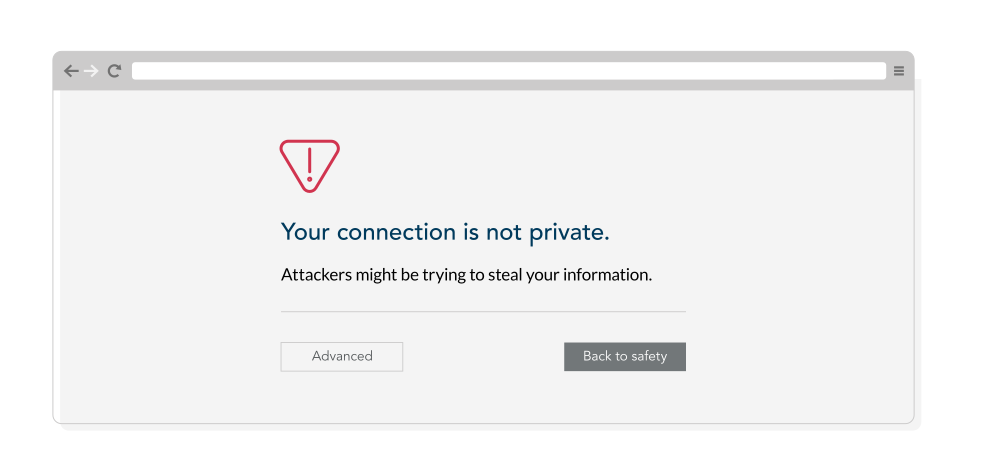
The business impact of expired SSL certificates
Expired SSL certificates pose serious risks for enterprises, leading to operations disruptions, security vulnerabilities, and regulatory non-compliance. Given the complexity of managing certificates across websites, applications, application programming interfaces (APIs), and internal systems, even a single lapse can result in significant financial and reputation damage.
Service disruptions and SLA violations
Many enterprises operate under strict service level agreements (SLAs) with customers and partners. An expired certificate can cause:
- Website and application outages due to browser security warnings.
- Disruptions in critical APIs and integrations, affecting third-party services.
- Authentication failures in virtual private networks (VPNs), databases, and enterprise applications.
If downtime violates SLA terms, businesses may face financial penalties, contract breaches, and lost customer trust.
Regulatory non-compliance and legal risks
Enterprises handling sensitive data are subject to strict regulatory requirements. Expired SSL certificates can lead to non-compliance with:
- General Data Protection Regulation (GDPR) – Data encryption is required to protect personal information; expired certificates can expose data to breaches.
- Service Organization Control 2 (SOC 2) – Expired certificates can indicate inadequate security controls, leading to audit failures.
- Information Security Management System (ISO 27001) – Requires organizations to manage encryption effectively as part of risk management.
- National Institute of Standards and Technology (NIST) guidelines – Recommend secure key and certificate life cycle management.
- Payment Card Industry Data Security Standard (PCI DSS) – Requires TLS encryption for payment data; expired certificates can lead to compliance violations and fines.
Non-compliance can result in regulatory fines, legal consequences, and reputation damage.
Security risks and data exposure
When SSL certificates expire, encrypted connections can default to insecure channels, exposing sensitive data to threats such as:
- Man-in-the-middle (MITM) attacks, where cybercriminals intercept confidential data.
- Phishing risks, as users encountering browser security warnings may be redirected to fraudulent sites.
- Loss of customer trust, as expired certificates raise concerns about security negligence.
Financial and brand consequences
Beyond direct security and compliance risks, expired certificates can harm brand reputation, customer confidence, and revenue.
- Customers may abandon transactions or switch to competitors when encountering security warnings.
- Search engines may penalize websites with certificate issues, impacting search engine optimization and visibility.
- Public trust can decline if an enterprise is seen as failing to secure its digital assets.
By ensuring certificates are renewed in a timely manner, website owners can maintain security, avoid disruptions, and protect their reputation.
How to check SSL certificate expiration
Online tools can be used to inspect expiration dates and automated monitoring applications may alert a company’s team before a certificate is due to expire. A person may manually inspect certification on a website by using a web browser, clicking the padlock icon in the address bar, and viewing the certificate details, which includes the expiration date.
For large enterprises managing hundreds or even thousands of SSL certificates—especially as certificate lifespans shrink to just 90 days—automation is essential to prevent expiration-related outages and disruptions.
What to do if an SSL certificate expired
If you discover your certificate has expired, act quickly to avoid downtime and other security risks. First, immediately renew the SSL certificate through your domain registrar or certificate authority. Once renewed, install the new certificate on your servers. This process may involve working with your IT team or hosting provider. After installation, check your website to ensure it’s functioning properly and that security warnings have disappeared.
Effective management of SSL certificates
Businesses need a systematic approach to certificate management and validity. Here are six strategies.
- Maintain an inventory of certificates. Keep a comprehensive list of all certificates, including their domains, issue dates, and expiration dates.
- Implement centralized oversight. Handling certificates manually can lead to overlooking renewals. A streamlined management solution ensures visibility and control over all certificates across your organization.
- Set up automated reminders. Tracking certificate expirations manually is tedious and error-prone, especially in large enterprises. Automated alerts ensure timely renewals without constant monitoring.
- Automate renewals. A centralized management solution can renew certificates automatically, preventing lapses and reducing IT workload. This keeps security seamless while freeing teams from manual oversight.
- Conduct regular audits. These processes will identify outdated, duplicate, or forgotten certificates, minimizing security gaps.
- Prepare for unexpected certificate issues. Even with automation, issues like misconfigurations or overlooked certificates can cause disruptions. A robust management solution provides real-time visibility, instant alerts, and tools to quickly resolve certificate failures—ensuring business continuity.
A simplified approach to updating SSL certificates
For a refined and secure approach, CSC’s Digital Certificate Management solution can simplify the entire life cycle of SSL and TLS certificates. Our platform provides centralized management, automated renewals, and real-time visibility, helping you avoid the pitfalls of expired certificates.
d • h • m • s until 100-day certificate life cycles
Frequently asked questions (FAQ)
For end-users on your website, when an SSL certificate expires, the web browser will display a security warning such as “Your connection is not private.” This exposes organizations to security risks and can lead to a loss of customer trust and lower search engine rankings.
You can check the status of a single SSL certificate simply using the address bar in your web browser. Just click the padlock icon in your URL address bar to see if your connection is secure and what date the SSL certificate will expire. Enterprises often have large portfolios of certificates, though, and this manual process is not scalable. To actively monitor the expiration of your SSL certificate, an automated certificate monitoring tool is recommended.
Large organizations often manage multiple web domains and web applications where an expired SSL certificate could cause major issues. It’s recommended to use a centralized and automated certificate management platform, automate your renewal process, and integrate SSL monitoring with your security processes and procedures.
Related resources

How CSC Helps Fletcher Building Manage Digital Assets, Including Domains and Digital Certificates

Navigating the Risk of Subdomain Hijacking:
Practical Solutions for 2025

Time to Act as Apple Sets Wheels in Motion for Shorter Certificate Life Cycles

Is Your Organization Prepared For 90-Day Digital Certificate Lifetimes?

Risk vs Benefit: The Impact of Shorter 90-Day SSL Certificate Life Cycles

DNS, Domain Names, and Certificates: The Missing Links in Most Cyber Security Risk Postures
Make an inquiry
All fields marked with * are required.